PfLine
The basic building block of the portfolyo package is the “portfolio line” (PfLine). Instances of this class store a timeseries containing volume information, price information, or both. This page discusses their most important properties, and how to use them.
For a tutorial, see here.
It is assumed that you are familiar with the following dimension abbrevations: w for power, q for energy, p for price, and r for revenue; see this page for more information.
Kind
An important characteristic of a portfolio line is its “kind”. The property PfLine.kind has a value from the portfolyo.Kind enumeration and tells us the type of information it contains:
🟨
Kind.VOLUME: “volume-only” portfolio line.This is a portfolio line that only contains volume information.
As an example, consider the expected/projected development of offtake volume of a customer or customer group.
The volume in each timestamp can be retrieved by the user in units of energy (e.g., MWh) or in units of power (e.g., MW).
🟩
Kind.PRICE: “price-only” portfolio line.This is a portfolio line which only contains price information.
For example, the forward price curve for a certain market area, or the fixed offtake price that a customer is paying for a certain delivery period.
🟦
Kind.REVENUE: “revenue-only” portfolio line.For example, the payoff of a financially-settled put option, which has a monetary value (e.g., in Eur) without an associated volume being delivered.
🟫
Kind.COMPLETEThis a portfolio line that contains volume, price and revenue information.
For example: the volume that has been sourced to hedge a certain portfolio, e.g. in monthly or quarterly blocks.
For each timestamp we have a volume (the contracted volume, both as energy and as power), a price (for which the volume was contracted) and a revenue (i.e., the multiplication of the energy and the price).
“Volume-only” and “complete” portfolio lines contain redundant information. For the volume, the power (in MW) can be calculated by dividing the energy (in MWh) by the duration of the timestamp (in h). Likewise, the price (in Eur/MWh) can be calculated by dividing the revenue (in Eur) by the energy (in MWh). See also the note in the next section.
Initialisation
There are many ways to specify the timeseries from which to initialise a portfolio line; here we will discuss the most common ones. In all cases it is assumed that the data has been prepared and standardized.
In General
portfolyo tries to determine the dimension of information (e.g., if it is a price or a volume) using its key (if it has one) and its unit (also, if it has one) - see the section on Compatilibity of abbrevation and unit.
To initialise a volume-only / price-only / revenue-only portfolio line, we must only provide a volume / price / revenue timeseries. To initialise a complete portfolio line, we must supply at least 2 of the following timeseries: prices, volumes, revenues.
Note
Specifying volumes: it is not necessary to specify both power (w) and energy (q); for a given timestamp we can calculate one from the other. If both are specified, they should be consistent with each other.
Specifying volumes and prices: the same goes when specifying volume (either w or q), price (p) and revenue (r). Only two are needed, and if more are specified, they should be consistent.
DataFrame or dictionary of timeseries…
…or any other Mapping from (string) key values to pandas.Series.
The keys (or dataframe column names) must each be one of the following: w (power), q (energy), p (price), r (revenue). Depending on the keys, the .kind of the portfolio line is determined.
import portfolyo as pf
import pandas as pd
index = pd.date_range('2024', freq='YS', periods=3)
input_dict = {'w': pd.Series([200, 220, 300.0], index)}
pf.PfLine(input_dict)
PfLine object with volume information.
. Start: 2024-01-01 00:00:00 (incl)    . Timezone    : none
. End  : 2027-01-01 00:00:00 (excl)    . Start-of-day: 00:00:00
. Freq : <YearBegin: month=1> (3 datapoints)
                                     w           q
                                    MW         MWh

2024-01-01 00:00:00              200.0   1 756 800
2025-01-01 00:00:00              220.0   1 927 200
2026-01-01 00:00:00              300.0   2 628 000
Timeseries with unit
Under the condition that a valid pint unit is present, we may also provide a single timeseries (pandas.Series), or an iterable of timeseries. They are automatically converted to the default unit.
# using the imports and index from the previous example
input_series = pd.Series([10, 11.5, 10.8], index, dtype='pint[ctEur/kWh]')
pf.PfLine(input_series)
PfLine object with price information.
. Start: 2024-01-01 00:00:00 (incl)    . Timezone    : none
. End  : 2027-01-01 00:00:00 (excl)    . Start-of-day: 00:00:00
. Freq : <YearBegin: month=1> (3 datapoints)
                                    p
                              Eur/MWh

2024-01-01 00:00:00            100.00
2025-01-01 00:00:00            115.00
2026-01-01 00:00:00            108.00
Dictionary of portfolio lines…
…or any other Mapping from (string) key values to PfLine objects.
The keys are used as the children names:
pfl1 = pf.PfLine(pd.Series([0.2, 0.22, 0.3], index, dtype='pint[GW]'))
pfl2 = pf.PfLine(pd.Series([100, 150, 200.0], index, dtype='pint[MW]'))
dict_of_children = {'southeast': pfl1, 'northwest': pfl2}
pfl = pf.PfLine(dict_of_children)
PfLine object with volume information.
. Start: 2024-01-01 00:00:00 (incl)    . Timezone    : none
. End  : 2027-01-01 00:00:00 (excl)    . Start-of-day: 00:00:00
. Freq : <YearBegin: month=1> (3 datapoints)
. Children: 'southeast' (volume), 'northwest' (volume)
                                     w           q
                                    MW         MWh

2024-01-01 00:00:00              300.0   2 635 200
2025-01-01 00:00:00              370.0   3 241 200
2026-01-01 00:00:00              500.0   4 380 000
Note that the aggregate values are shown.
Nesting is not limited to one level, and, instead of having each value be a PfLine objects, it is actually sufficient that each value can be used to initialise a PfLine object.
Flat or Nested
As seen in the final initialisation example, we can create nested portfolio lines, where a portfolio line contains one or more named children (which are also portfolio lines). This in contrast to the ‘flat’ portfolio lines we created in the first initialisation example.
Note
When checking the types, you will see that these are actually different classes - in the examples above FlatVolumePfLine, FlatPricePfLine, and NestedVolumePfLine. All are descendents of the PfLine base class. When initialising a PfLine, the correct type will be returned based on the input data.
For nested portfolio lines, we are always looking at and working with the the top level, i.e., the sum/aggregate - unless explicitly requested otherwise by the user.
An example of where a nested portfolio line makes sense, is to combine procurement on the forward market and spot trade into a single “sourced” portfolio line. We can then easily work with the aggregate values, but the values of the individual markets are also still available.
It is important to note that both types of portfolio line contain the exact same methods and properties that are described in the rest of this document. Nested portfolio lines do have a few additional methods which are described now.
Working with children
The following common operations on nested portfolio lines are implemented:
We can access a particular child by using its name as an index, e.g.
pfl['southeast']. If it does not collide with any of the attribute names, we can also access it by attribute, e.g.pfl.southeast.We can iterate over all children with
for name in pflorfor (name, child) in pfl.items().We can add a new child to a portfolio with
pfl_new = pfl.set_child('southwest', ...). this returns a reference to the new object; the original object is unchanged. (It is immutable by design.)Likewise, we can remove a child from the portfolio with
pfl_new = pfl.drop_child('southeast'). At least one child should remain.If we are no longer interested in the particulars of each child, we can keep only the top-level information with the
.flatten()method, which returns a flattened copy of the object.Note that a portfolio line may quietly be flattened whenever an operation is done that is ambiguous or undefined for a portfolio line with children. See the section on arithmatic below.
Accessing data
In order to get our data out of a portfolio line, the following options are available.
Timeseries
The properties PfLine.w, .q, .p and .r always return the information as a pandas.Series. These have a pint unit, which can be stripped using .pint.m (or .pint.magnitude).
import portfolyo as pf, pandas as pd
index = pd.date_range('2024', freq='YS', periods=3)
input_df = pd.DataFrame({'w':[200, 220, 300], 'p': [100, 150, 200]}, index)
pfl = pf.PfLine(input_df)

pfl.r
2024-01-01    175680000.0
2025-01-01    289080000.0
2026-01-01    525600000.0
Freq: YS-JAN, Name: r, dtype: pint[Eur]
DataFrame
If we want to extract more than one timeseries, we can use the .df attribute, which contains all relevant (top-level) timeseries.
# continuation of previous code example
pfl.df
                w          q      p            r
2024-01-01  200.0  1756800.0  100.0  175680000.0
2025-01-01  220.0  1927200.0  150.0  289080000.0
2026-01-01  300.0  2628000.0  200.0  525600000.0
We can also use the .dataframe() method, which has a few options to control the exact format and contents of the dataframe.
Index
The PfLine.index property returns the pandas.DatetimeIndex that applies to the data. This includes the frequency that tells us how long the time periods are that start at each of the timestamps in the index.
# continuation of previous code example
pfl.index
DatetimeIndex(['2024-01-01', '2025-01-01', '2026-01-01'], dtype='datetime64[ns]', freq='YS-JAN')
For convenience, portfolyo adds a .duration and a right property to the pandas.DatetimeIndex class, which do as we would predict:
# continuation of previous code example
pfl.index.duration, pfl.index.right
2024-01-01    8784.0
2025-01-01    8760.0
2026-01-01    8760.0
Freq: YS-JAN, Name: duration, dtype: pint[h]
 DatetimeIndex(['2025-01-01', '2026-01-01', '2027-01-01'], dtype='datetime64[ns]', name='right', freq='YS-JAN')
Index slice
From pandas we know the .loc[] property which allows us to select a slice of the objects. This is implemented also for portfolio lines. Currently, it supports enering a slice of timestamps. It is a wrapper around the pandas.DataFrame.loc[] property, and therefore follows the same convention, with the end point being included in the result.
Another slicing method is implemented with the .slice[] property. The improvement to .loc[] is, that .slice[] uses the more common convention of excluding the end point. This has several advantages, which stem from the fact that, unlike when using .loc, using left = pfl.slice[:a] and right = pfl.slice[a:] returns portfolio lines that are complements - every timestamp in the original portfolio line is found in either the left or the right slice. This is useful when e.g. concatenating portfolio lines (see below.)
# continuation of previous code example
pfl.slice['2024':'2026']  # excludes 2026; 2026 interpreted as timestamp 2026-01-01 00:00:00
PfLine object with complete information.
. Start: 2024-01-01 00:00:00 (incl)    . Timezone    : none
. End  : 2026-01-01 00:00:00 (excl)    . Start-of-day: 00:00:00
. Freq : <YearBegin: month=1> (2 datapoints)
                                     w           q           p             r
                                    MW         MWh     Eur/MWh           Eur

2024-01-01 00:00:00              200.0   1 756 800      100.00   175 680 000
2025-01-01 00:00:00              220.0   1 927 200      150.00   289 080 000
Reindexing
A portfolio line can be reindexed with .index(), using another index, e.g. of another portfolio line. This returns a new portfolio line, with the specified index. Any timestamps that were not present in the original object are filled with “zero” (as applicable).
# continuation of previous code example
index2 = pd.date_range('2025', freq='YS', periods=3)
pfl.reindex(index2)  # 2024 is dropped; 2025 and 2026 are kept; 2027 is new (0)
PfLine object with complete information.
. Start: 2025-01-01 00:00:00 (incl)    . Timezone    : none
. End  : 2028-01-01 00:00:00 (excl)    . Start-of-day: 00:00:00
. Freq : <YearBegin: month=1> (3 datapoints)
                                     w           q           p             r
                                    MW         MWh     Eur/MWh           Eur

2025-01-01 00:00:00              220.0   1 927 200      150.00   289 080 000
2026-01-01 00:00:00              300.0   2 628 000      200.00   525 600 000
2027-01-01 00:00:00                0.0           0                         0
Concatenation
Portfolio lines can be concatenated with the portfolio.concat() function. This only works if the input portfolio lines have contain compatible information (the same frequency, timezone, start-of-day, kind, etc) and, crucially, their indices are gapless and without overlap. To remove any overlap, use the .slice[] property.
# continuation of previous code example
index2 = pd.date_range('2025', freq='YS', periods=3)  # 2 years' overlap with pfl
pfl2 = pf.PfLine(pd.DataFrame({'w':[22, 30, 40], 'p': [15, 20, 21]}, index))
# first two datapoints (until/excl 2026) from pfl, last two datapoints (from/incl 2026) from pfl2
pf.concat([pfl.slice[:'2026'], pfl2.slice['2026':]])
PfLine object with complete information.
. Start: 2024-01-01 00:00:00 (incl)    . Timezone    : none
. End  : 2027-01-01 00:00:00 (excl)    . Start-of-day: 00:00:00
. Freq : <YearBegin: month=1> (3 datapoints)
                                     w           q           p             r
                                    MW         MWh     Eur/MWh           Eur

2024-01-01 00:00:00              200.0   1 756 800      100.00   175 680 000
2025-01-01 00:00:00              220.0   1 927 200      150.00   289 080 000
2026-01-01 00:00:00               40.0     350 400       21.00     7 358 400
Volume-only, price-only or revenue-only
With the .volume, .price and .revenue properties, we are able to extract the specified data from a complete portfolio line. For nested portfolios lines, the returned PfLine may still be flat; this is the case if keeping the children would lead to incorrect values. (E.g., getting the price part of a nested complete portfolio line: the aggregate price is the average of the children’s prices, weighted with their volumes. The individual prices cannot simply be added up.)
Further below, in the section on arithmatic, we see the reverse operation: combining two portfolio lines into a complete one.
Plotting / Excel / Clipboard
There are several ways to get data into other formats.
Plotting
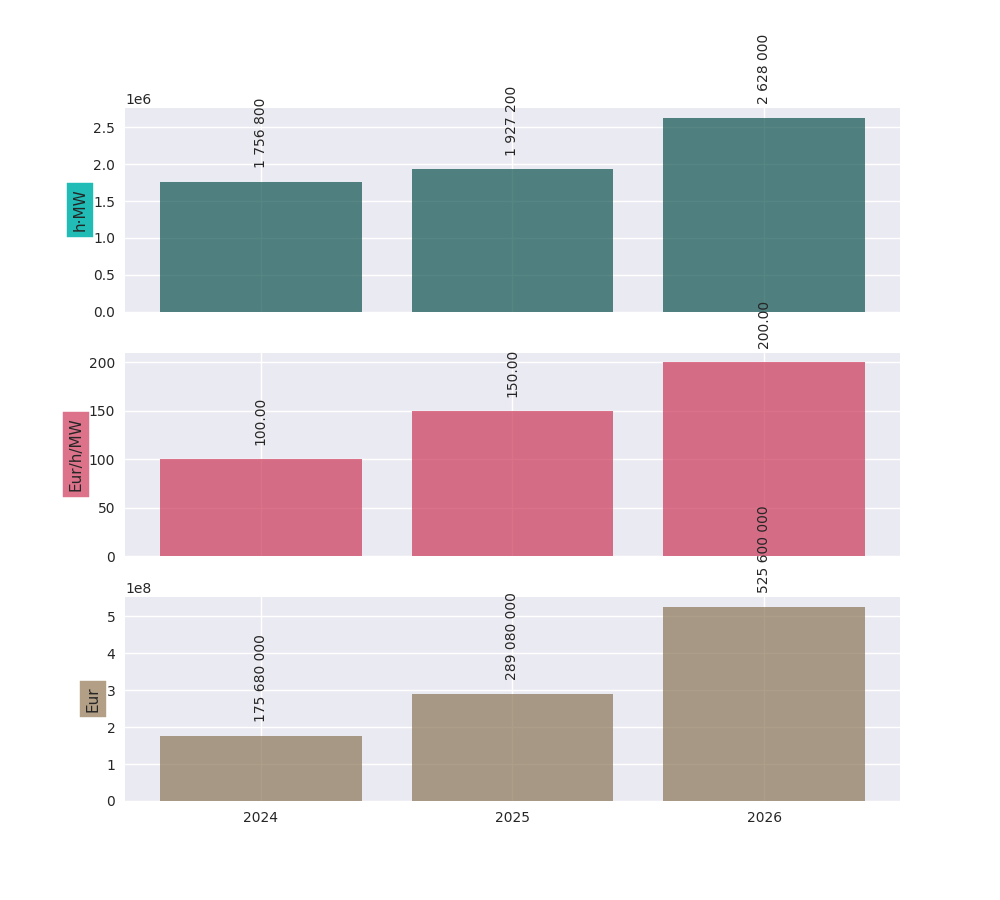
The data can be shown graphically with the .plot() method:
# continuation of previous code example
pfl.plot()
Excel and clipboard
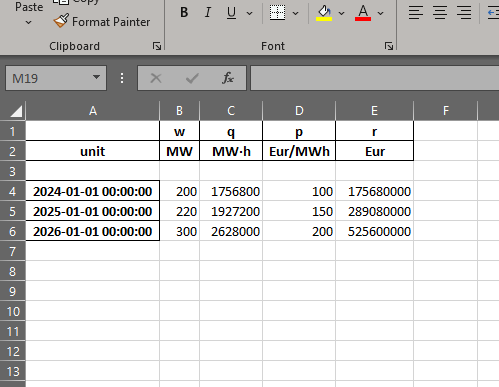
Often, further data analyses are done in Excel. If you have a Workbook open, the easiest way is to copy the portfolio line data to the clipboard with the .to_clipboard() method. From there, it can be pasted onto a worksheet.
Alternatively, the data can be saved as an Excel workbook with the .to_excel() method.
# continuation of previous code example
pfl.to_clipboard()
pfl.to_excel("sourced_volume.xlsx")
Resampling
Using the .asfreq() method, we can quickly and correctly downsample our data, e.g. to monthly or yearly values. For price-and-volume portfolio lines, the prices are weighted with the energy as one would expect:
# continuation of previous code example
pfl.asfreq('QS')
PfLine object with complete information.
. Start: 2024-01-01 00:00:00 (incl)    . Timezone    : none
. End  : 2027-01-01 00:00:00 (excl)    . Start-of-day: 00:00:00
. Freq : <QuarterBegin: startingMonth=1> (12 datapoints)
                                     w           q           p             r
                                    MW         MWh     Eur/MWh           Eur

2024-01-01 00:00:00              200.0     436 800      100.00    43 680 000
2024-04-01 00:00:00              200.0     436 800      100.00    43 680 000
2024-07-01 00:00:00              200.0     441 600      100.00    44 160 000
2024-10-01 00:00:00              200.0     441 600      100.00    44 160 000
2025-01-01 00:00:00              220.0     475 200      150.00    71 280 000
2025-04-01 00:00:00              220.0     480 480      150.00    72 072 000
2025-07-01 00:00:00              220.0     485 760      150.00    72 864 000
2025-10-01 00:00:00              220.0     485 760      150.00    72 864 000
2026-01-01 00:00:00              300.0     648 000      200.00   129 600 000
2026-04-01 00:00:00              300.0     655 200      200.00   131 040 000
2026-07-01 00:00:00              300.0     662 400      200.00   132 480 000
2026-10-01 00:00:00              300.0     662 400      200.00   132 480 000
For more information about resampling in general, see this page.
Arithmatic
There are many ways to change and interact with PfLine instances. An intuitive way is through arithmatic, described below. The operations are grouped by the operator, and colors are used to more easily indicate the type of the output value.
General remarks:
The operands are defined liberally. E.g. “price” means any object that can be interpreted as a price: a single
pint.Quantitywith a valid price unit; apandas.Serieswith apintunit of price, a dictionary with a single key"p", apandas.Dataframewith a single column"p", or a price-only portfolio line; see Interoperability.The following code example shows a few equivalent operations.
import portfolyo as pf, pandas as pd
index = pd.date_range('2024', freq='YS', periods=3)
pfl = pf.PfLine(pd.Series([2, 2.2, 3], index, dtype='pint[MW]'))
pfl_1 = pfl + {'q': 50.0}  # standard unit (here: MWh) is assumed
pfl_2 = pfl + pf.Q_(50000.0, 'kWh')
pfl_3 = pfl + {'q': pd.Series([50, 50, 50.0], index)}
pfl_4 = pfl + pf.PfLine({'q': pd.Series([50, 50, 50.0], index)})
pfl_1 == pfl_2 == pfl_3 == pfl_4
True
If two portfolio lines span distinct periods, only their overlap is kept. If instead we want to keep all timestamps, e.g., when adding a portfolio line which spans a quarter to one that spans a year (with the same frequency, e.g. hourly), first use the
.reindex()method on the former with the index of the latter. The values outside the specified quarter are filled with “zero” values as is applicable to the kind of portfolio line under consideration.A single value is understood to apply uniformly to each timestamp in the index of the portfolio line.
When doing arithmatic with a flat portfolio line, the result is again a flat portfolio line.
When doing arithmatic with a nested portfolio line, the children are also present in the result.
Arithmatic does silent flattening if necessary. E.g., if an operation is only possible if one or both of the operands is flat, this will be done automatically. (A nested portfolio line can also be flattened manually with the
.flatten()method.)However, an
Exceptionis raised in case of ambiguity concerning the unit. E.g., when adding afloatvalue to aPRICEportfolio line. Solution: explicitly convert into apint.Quantityusingpf.Q_().The usual relationship between addition and multiplication holds. E.g., for a given portfolio line
pfl, the following two calculations have the same return value:pfl + pfland2 * pfl.
Addition and subtraction
Addition and subtraction are only possible between operands of the same kind. E.g., to a price-only portfolio line, a price can be added, but not e.g. a volume.
Even if the both operands have the same kind, they must both be nested or both be flat. E.g., a flat price can be added to a flat price-only portfolio line, but not to a nested price-only portfolio line. Two nested price-only portfolio lines can be added.
Kind of portfolio line (pfl.Kind) |
||||
|---|---|---|---|---|
🟨 |
🟩 |
🟦 |
🟫 |
|
|
🟨 e |
❌ |
❌ |
❌ |
|
❌ |
🟩 e |
❌ |
❌ |
|
❌ |
❌ |
🟦 e |
❌ |
|
❌ |
❌ |
❌ |
🟫 e |
Notes:
- e
“Equal”: both operands must be flat or both must be nested.
Here are several examples.
Adding a volume to a volume-only portfolio line:
import portfolyo as pf, pandas as pd
index = pd.date_range('2024', freq='YS', periods=3)
vol = pf.PfLine(pd.Series([4, 4.6, 3], index, dtype='pint[MW]'))
vol + pf.Q_(10.0, 'GWh')
PfLine object with volume information.
. Start: 2024-01-01 00:00:00 (incl)    . Timezone    : none
. End  : 2027-01-01 00:00:00 (excl)    . Start-of-day: 00:00:00
. Freq : <YearBegin: month=1> (3 datapoints)
                                     w           q
                                    MW         MWh

2024-01-01 00:00:00                5.1      45 136
2025-01-01 00:00:00                5.7      50 296
2026-01-01 00:00:00                4.1      36 280
When adding (or subtracting) two nested portfolio lines, the children are merged:
# continuation of previous code example
vol_2 = pf.PfLine({
    'A': pd.Series([4, 4.6, 3], index, dtype='pint[MW]'),
    'B': pd.Series([1, -1.8, 1.9], index, dtype='pint[MW]')
})
vol_3 = pf.PfLine({
    'B': pd.Series([0.5, 0.2, 1.9], index, dtype='pint[MW]'),
    'C': pd.Series([2, 2.2, 3.8], index, dtype='pint[MW]')
})
diff = vol_2 - vol_3

print([name for name in diff])
diff['B']
['C', 'B', 'A']

PfLine object with volume information.
. Start: 2024-01-01 00:00:00 (incl)    . Timezone    : none
. End  : 2027-01-01 00:00:00 (excl)    . Start-of-day: 00:00:00
. Freq : <YearBegin: month=1> (3 datapoints)
                                     w           q
                                    MW         MWh

2024-01-01 00:00:00                0.5       4 392
2025-01-01 00:00:00               -2.0     -17 520
2026-01-01 00:00:00                0.0           0
A flat and a nested portfolio line cannot be added…
…and if we try, the nested one is flattened (and the result is also a flat portfolio line):
# continuation of previous code example
vol + vol_2
If we want, we can keep the children. In that case, we must give the flat one a name as well (and the result is a nested portfolio line):
# continuation of previous code example
vol_2 + {'D': vol}
PfLine object with volume information.
. Start: 2024-01-01 00:00:00 (incl)    . Timezone    : none
. End  : 2027-01-01 00:00:00 (excl)    . Start-of-day: 00:00:00
. Freq : <YearBegin: month=1> (3 datapoints)
. Children: 'A' (volume), 'D' (volume), 'B' (volume)
                                     w           q
                                    MW         MWh

2024-01-01 00:00:00                9.0      79 056
2025-01-01 00:00:00                7.4      64 824
2026-01-01 00:00:00                7.9      69 204
Scaling
We can scale a portfolio line by multiplication with / division by a dimensionless (e.g. float) value.
This applied to flat and nested portfolio line, regardless of the kind.
The result is a portfolio line of the same kind.
If the portfolio line is nested, the scaling applies to all children.
For complete portfolio lines, the volume and revenue are scaled, while the price remains unchanged.
Negation is implemented as multiplication with -1.
Kind of portfolio line (pfl.Kind) |
||||
|---|---|---|---|---|
🟨 |
🟩 |
🟦 |
🟫 |
|
|
🟨 |
🟩 |
🟦 |
🟫 |
|
🟨 |
🟩 |
🟦 |
🟫 |
|
🟨 |
🟩 |
🟦 |
🟫 |
For example:
import portfolyo as pf, pandas as pd
index = pd.date_range('2024', freq='MS', periods=3)
vol = pf.PfLine(pd.Series([100, 250, 100], index, dtype='pint[MW]'))
vol * 2  # multiplication with factor results in scaled portfolio line
PfLine object with volume information.
. Start: 2024-01-01 00:00:00 (incl)    . Timezone    : none
. End  : 2024-04-01 00:00:00 (excl)    . Start-of-day: 00:00:00
. Freq : <MonthBegin> (3 datapoints)
                                     w           q
                                    MW         MWh

2024-01-01 00:00:00              200.0     148 800
2024-02-01 00:00:00              500.0     348 000
2024-03-01 00:00:00              200.0     148 800
Calculating ratio
We can calculate the ratio of two portfolyo lines by dividing them.
The portfolio lines must both be flat, and of the same kind.
The result is a dimensionless
pandas.Series.None of the operands may be nested. First
.flatten()if necessary.None of the operands may be a complete portfolio line. First select the
.volume,.priceor.revenueif necessary.
Kind of portfolio line (pfl.Kind) |
||||
|---|---|---|---|---|
🟨 |
🟩 |
🟦 |
🟫 |
|
|
⬛️ 2f |
❌ |
(❌) |
❌ |
|
❌ |
⬛️ 2f |
(❌) |
❌ |
|
❌ |
❌ |
⬛️ 2f |
❌ |
Notes:
- 2f
Both operands must be flat.
- (❌)
This operation is allowed but does not result in a ratio. It is described in the section changekind below.
For example:
# continuation of previous code example
vol / pf.Q_(200.0, 'MW')  # division by volume results in dimensionless series
2024-01-01     0.5
2024-02-01    1.25
2024-03-01     0.5
Freq: MS, Name: fraction, dtype: pint[]
Changing kind
We can turn one kind of portfolio line into another kind, by multiplying with or division by the correct (third) kind.
Concrete, because price * volume = revenue, we have these possibilities:
Multiplying a volume portfolio line with a price portfolio line results in a revenue portfolio line.
Dividing a revenue portfolio line by a price portfolio line results in a volume portfolio line.
Dividing a revenue portfolio line by a volume portfolio line results in a price portfolio line.
At most one of the operands may be nested. First
.flatten()if necessary.If one of the operands is nested, the value of the flat operand is combined with each child of the nested one.
None of the operands may be a complete portfolio line. First select the
.volume,.priceor.revenueif necessary.To combine two portfolio lines into a complete portfolio line, see the section Union into complete portfolio line, below.
Kind of portfolio line (pfl.Kind) |
||||
|---|---|---|---|---|
🟨 |
🟩 |
🟦 |
🟫 |
|
|
❌ |
🟦 ≥1f |
❌ |
❌ |
|
🟦 ≥1f |
❌ |
❌ |
❌ |
|
(❌) |
❌ |
🟩 ≥1f |
❌ |
|
❌ |
(❌) |
🟨 ≥1f |
❌ |
Notes:
- ≥1f
At least one of the operands must be flat.
- (❌)
This operation is allowed but results in a ratio. It is described in the section Calculating ratio above.
Here is an examples:
# continuation of previous code example
vol * pf.Q_(100.0, 'Eur/MWh')  # multiplication with price results in revenue
PfLine object with revenue information.
. Start: 2024-01-01 00:00:00 (incl)    . Timezone    : none
. End  : 2024-04-01 00:00:00 (excl)    . Start-of-day: 00:00:00
. Freq : <MonthBegin> (3 datapoints)
                                      r
                                    Eur

2024-01-01 00:00:00           7 440 000
2024-02-01 00:00:00          17 400 000
2024-03-01 00:00:00           7 440 000
Union into complete portfolio line
We can combine portfolio lines of distinct kind into a complete portfolio line. We use the union operator | for this.
None of the operands may be a complete portfolio line. First select the
.volume,.priceor.revenueif necessary.Both operands must be flat. If necessary, first
.flatten()a nested portfolio line.
Kind of portfolio line (pfl.Kind) |
||||
|---|---|---|---|---|
🟨 |
🟩 |
🟦 |
🟫 |
|
|
❌ |
🟫 2f⠀ |
🟫 2f⠀ |
❌ |
|
🟫 2f⠀ |
❌ |
🟫 2f⠀ |
❌ |
|
🟫 2f⠀ |
🟫 2f⠀ |
❌ |
❌ |
- 2f
Both operands must be flat.
Example with flat portfolio lines:
# continuation of previous code example
vol | pf.Q_(100.0, 'Eur/MWh')  # union with price results in complete portfolio line
PfLine object with complete information.
. Start: 2024-01-01 00:00:00 (incl)    . Timezone    : none
. End  : 2024-04-01 00:00:00 (excl)    . Start-of-day: 00:00:00
. Freq : <MonthBegin> (3 datapoints)
                                     w           q           p             r
                                    MW         MWh     Eur/MWh           Eur

2024-01-01 00:00:00              100.0      74 400      100.00     7 440 000
2024-02-01 00:00:00              250.0     174 000      100.00    17 400 000
2024-03-01 00:00:00              100.0      74 400      100.00     7 440 000
Set timeseries
Sometimes we may want to replace one part of a PfLine, while keeping the others the same. For this, first select the part we want to keep, and then use the union operator to combine it with the wanted quantity. E.g.: pfl.volume | pf.Q_(100, 'Eur/MWh')
Hedging
In general, hedging is the act of reducing the exposure to certain risks. In power and gas portfolios, it is common for customers to pay a fixed, pre-agreed price for the volume they consume. By sourcing volume on the market as soon as a customer is acquired, the open positions can be kept small, effectively hedging the portfolio’s profit against market price changes.
A perfect hedge would be to buy the exact offtake volume of a portfolio in every delivery period at the shortest time-scale, e.g., days for gas and (quarter) hours for power. This is usually not possible, and hedging is done with standard products instead. Depending on the time until delivery, these may be month, quarter, or year bands; in power these exists for base, peak, and offpeak.
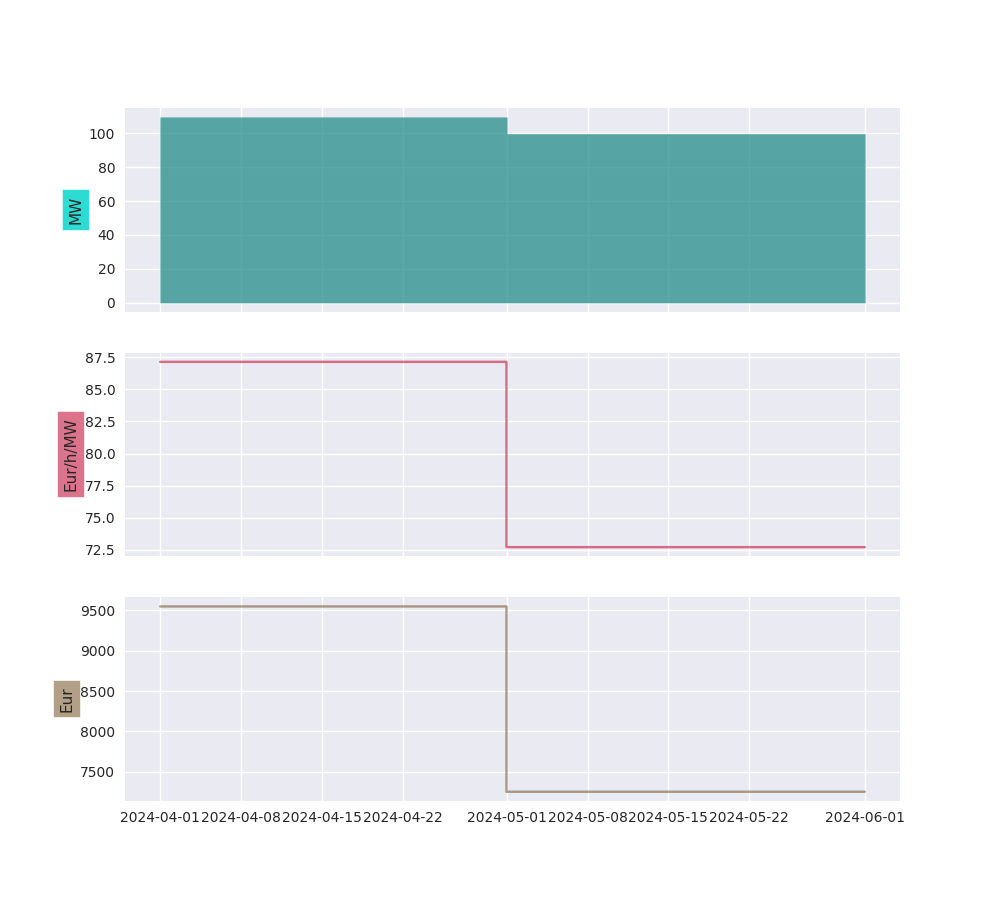
Using the .hedge_with() method, the volume timeseries in a portfolio line is compared with a price timeseries, and the corresponding portfolio line in standard products is returned. Parameters specify the forward price curve, the length of the products (e.g. months), the hedge method (volume hedge or value hedge), and whether to use a base band or split in peak and offpeak values.
import portfolyo as pf, pandas as pd
index = pd.date_range('2024-04-01', '2024-06-01', freq='h', inclusive='left')
offtake = pf.PfLine(pf.dev.w_offtake(index))  # mock offtake volumes
prices = pf.PfLine(pf.dev.p_marketprices(index)) # mock market prices
# Create hedge
hedge = offtake.hedge_with(prices, 'vol')
# Compare the two:
(offtake | prices).plot()
hedge.plot()

Peak and offpeak
For markets that have a concept of “peak” and “offpeak” periods, the .po() method splits the values in peak and offpeak. We need to specifiy a PeakFunction to determine which periods are peak - we can create one with portfolyo.create_peakfn(), or we use the one for the German power market which is provided under portfolyo.germanpower_peakfn. We can again specify if we want monthly, quarterly, or yearly values.
# continuation of previous code example
offtake.po(pf.germanpower_peakfn)
                    duration                   q                   w
2024-04-01 peak        264.0  33317.679366836615  126.20333093498718
           offpeak     456.0   45597.88306463254   99.99535759787837
2024-05-01 peak        276.0  31969.613247278034   115.8319320553552
           offpeak     468.0   42306.28521664748   90.39804533471683
NB: be cautious in using the output of this method. The values in the “sub-dataframes” do not apply to the entire time period, so the usual relations (e.g. energy = power * duration) do not hold if the duration of the entire time period is used. For convenience, the relevant duration (of only the peak or only the offpeak hours) is included in the dataframe.
API
- class portfolyo.PfLine(data=None, *args, **kwargs)
Class to hold a related energy timeseries. This can be volume data (with q [MWh] and w [MW]), price data (with p [Eur/MWh]), revenue data (with r [Eur]), or a combination of all.
- abstract asfreq(freq: str = 'MS') NDFrameLike
Resample the instance to a new frequency.
- Parameters:
freq (str, optional) – The frequency at which to resample. ‘YS’ for year, ‘QS’ for quarter, ‘MS’ (default) for month, ‘D for day’, ‘h’ for hour, ‘15min’ for quarterhour.
- Returns:
Resampled at wanted frequency.
- Return type:
Instance
- abstract dataframe(cols: Iterable[str] | None = None, has_units: bool = True, *args, **kwargs) DataFrame
DataFrame for portfolio line in default units.
- Parameters:
cols (str, optional (default: all that are available)) – The columns (w, q, p, r) to include in the dataframe. Columns that are not available are silently excluded.
has_units (bool, optional (default: True)) –
- If True, return dataframe with
pintunits. (The unit can be extracted as a column level with
.pint.dequantify()).
- If True, return dataframe with
If False, return dataframe with float values.
- Return type:
pd.DataFrame
- property end: Timestamp
End (excl) of the portfolio line.
- abstract hedge_with(p: PricePfLine, how: str = 'val', peak_fn: Callable[[DatetimeIndex], Series] | None = None, freq: str = 'MS') PfLine
Hedge the volume in the portfolio line with a price curve.
- Parameters:
p (PricePfLine) – Portfolio line with prices to be used in the hedge.
how (str, optional (Default: 'val')) – Hedge-constraint. ‘vol’ for volumetric hedge, ‘val’ for value hedge.
peak_fn (PeakFunction, optional (default: None)) – To hedge with peak and offpeak products: function that returns boolean Series indicating if timestamps in index lie in peak period. If None, hedge with base products.
freq ({'D' (days), 'MS' (months, default), 'QS' (quarters), 'YS' (years)}) – Frequency of hedging products. E.g. ‘QS’ to hedge with quarter products.
See also
portfolyo.create_peakfn,portfolyo.germanpower_peakfn- Returns:
Hedged volume and prices. Index with same frequency as original, but every timestamp within a given hedging frequency has the same volume [MW] and price. (or, one volume-price pair for peak, and another volume-price pair for offpeak.)
- Return type:
Notes
If the PfLine contains prices, these are ignored.
- property index: DatetimeIndex
Index of the data, containing the left-bound timestamps of the delivery periods.
- abstract property loc
Create a new instance with a subset of the rows (selection by row label(s) or a boolean array.)
- abstract property p: Series
Return (flat) price timeseries in [Eur/MWh].
- plot(children: bool = False) Figure
Plot the PfLine.
- Parameters:
children (bool, optional (default: False)) – If True, plot also the direct children of the PfLine.
- Returns:
The figure object to which the series was plotted.
- Return type:
plt.Figure
- plot_to_ax(ax: plt.Axes, children: bool = False, kind: Kind = None, **kwargs) None
Plot a specific dimension (i.e., kind) of the PfLine to a specific axis.
- Parameters:
ax (plt.Axes) – The axes object to which to plot the timeseries.
children (bool, optional (default: False)) – If True, plot also the direct children of the PfLine.
kind (Kind, optional (default: None)) – What dimension of the data to plot. Ignored unless PfLine.kind is COMPLETE.
**kwargs – Any additional kwargs are passed to the pd.Series.plot function when drawing the parent.
- Return type:
None
- abstract po(peak_fn: Callable[[DatetimeIndex], Series], freq: str = 'MS') DataFrame
Decompose the portfolio line into peak and offpeak values. Takes simple (duration- weighted) averages of volume [MW] and price [Eur/MWh] - does not hedge!
- Parameters:
peak_fn (PeakFunction) – Function that returns boolean Series indicating if timestamps in index lie in peak period.
freq ({'MS' (months, default), 'QS' (quarters), 'YS' (years)}) – Frequency of resulting dataframe.
- Returns:
The dataframe shows a composition into peak and offpeak values.
- Return type:
pd.DataFrame
Notes
Only relevant for hourly (and shorter) data.
- print(flatten: bool = False, num_of_ts: int = 5, color: bool = True) None
Treeview of the portfolio line.
- Parameters:
flatten (bool, optional (default: False)) – if True, show only the top-level (aggregated) information.
num_of_ts (int, optional (default: 5)) – How many timestamps to show for each PfLine.
color (bool, optional (default: True)) – Make tree structure clearer by including colors. May not work on all output devices.
- Return type:
None
- abstract property q: Series
Return (flat) volume timeseries in [MWh].
- abstract property r: Series
Return (flat) revenue timeseries in [Eur].
- abstract reindex(index: DatetimeIndex)
Reindex and fill any new values with zero (where applicable).
- abstract property slice
Create a new instance with a subset of the rows. Different from loc since performs slicing with right-open interval.
- property start: Timestamp
Start (incl) of the portfolio line.
- to_clipboard(*, excel: bool = True, sep: str | None = None, **kwargs) None
Copy object to the system clipboard.
Write a text representation of object to the system clipboard. This can be pasted into Excel, for example.
- Parameters:
excel (bool, default True) –
Produce output in a csv format for easy pasting into excel.
True, use the provided separator for csv pasting.
False, write a string representation of the object to the clipboard.
sep (str, default
'\t') – Field delimiter.**kwargs – These parameters will be passed to DataFrame.to_csv.
See also
DataFrame.to_csvWrite a DataFrame to a comma-separated values (csv) file.
read_clipboardRead text from clipboard and pass to read_csv.
Notes
Requirements for your platform.
Linux : xclip, or xsel (with PyQt4 modules)
Windows : none
macOS : none
This method uses the processes developed for the package pyperclip. A solution to render any output string format is given in the examples.
Examples
Copy the contents of a DataFrame to the clipboard.
>>> df = pd.DataFrame([[1, 2, 3], [4, 5, 6]], columns=['A', 'B', 'C'])
>>> df.to_clipboard(sep=',')
... # Wrote the following to the system clipboard:
... # ,A,B,C
... # 0,1,2,3
... # 1,4,5,6
We can omit the index by passing the keyword index and setting it to false.
>>> df.to_clipboard(sep=',', index=False)
... # Wrote the following to the system clipboard:
... # A,B,C
... # 1,2,3
... # 4,5,6
Using the original pyperclip package for any string output format.
import pyperclip
html = df.style.to_html()
pyperclip.copy(html)
- to_excel(excel_writer: FilePath | WriteExcelBuffer | ExcelWriter, *, sheet_name: str = 'Sheet1', na_rep: str = '', float_format: str | None = None, columns: Sequence[Hashable] | None = None, header: Sequence[Hashable] | bool_t = True, index: bool_t = True, index_label: IndexLabel | None = None, startrow: int = 0, startcol: int = 0, engine: Literal['openpyxl', 'xlsxwriter'] | None = None, merge_cells: bool_t = True, inf_rep: str = 'inf', freeze_panes: tuple[int, int] | None = None, storage_options: StorageOptions | None = None, engine_kwargs: dict[str, Any] | None = None) None
Write object to an Excel sheet.
To write a single object to an Excel .xlsx file it is only necessary to specify a target file name. To write to multiple sheets it is necessary to create an ExcelWriter object with a target file name, and specify a sheet in the file to write to.
Multiple sheets may be written to by specifying unique sheet_name. With all data written to the file it is necessary to save the changes. Note that creating an ExcelWriter object with a file name that already exists will result in the contents of the existing file being erased.
- Parameters:
excel_writer (path-like, file-like, or ExcelWriter object) – File path or existing ExcelWriter.
sheet_name (str, default 'Sheet1') – Name of sheet which will contain DataFrame.
na_rep (str, default '') – Missing data representation.
float_format (str, optional) – Format string for floating point numbers. For example
float_format="%.2f"will format 0.1234 to 0.12.columns (sequence or list of str, optional) – Columns to write.
header (bool or list of str, default True) – Write out the column names. If a list of string is given it is assumed to be aliases for the column names.
index (bool, default True) – Write row names (index).
index_label (str or sequence, optional) – Column label for index column(s) if desired. If not specified, and header and index are True, then the index names are used. A sequence should be given if the DataFrame uses MultiIndex.
startrow (int, default 0) – Upper left cell row to dump data frame.
startcol (int, default 0) – Upper left cell column to dump data frame.
engine (str, optional) – Write engine to use, ‘openpyxl’ or ‘xlsxwriter’. You can also set this via the options
io.excel.xlsx.writerorio.excel.xlsm.writer.merge_cells (bool, default True) – Write MultiIndex and Hierarchical Rows as merged cells.
inf_rep (str, default 'inf') – Representation for infinity (there is no native representation for infinity in Excel).
freeze_panes (tuple of int (length 2), optional) – Specifies the one-based bottommost row and rightmost column that is to be frozen.
storage_options (dict, optional) –
Extra options that make sense for a particular storage connection, e.g. host, port, username, password, etc. For HTTP(S) URLs the key-value pairs are forwarded to
urllib.request.Requestas header options. For other URLs (e.g. starting with “s3://”, and “gcs://”) the key-value pairs are forwarded tofsspec.open. Please seefsspecandurllibfor more details, and for more examples on storage options refer here.Added in version 1.2.0.
engine_kwargs (dict, optional) – Arbitrary keyword arguments passed to excel engine.
See also
to_csvWrite DataFrame to a comma-separated values (csv) file.
ExcelWriterClass for writing DataFrame objects into excel sheets.
read_excelRead an Excel file into a pandas DataFrame.
read_csvRead a comma-separated values (csv) file into DataFrame.
io.formats.style.Styler.to_excelAdd styles to Excel sheet.
Notes
For compatibility with
to_csv(), to_excel serializes lists and dicts to strings before writing.Once a workbook has been saved it is not possible to write further data without rewriting the whole workbook.
Examples
Create, write to and save a workbook:
>>> df1 = pd.DataFrame([['a', 'b'], ['c', 'd']],
...                    index=['row 1', 'row 2'],
...                    columns=['col 1', 'col 2'])
>>> df1.to_excel("output.xlsx")
To specify the sheet name:
>>> df1.to_excel("output.xlsx",
...              sheet_name='Sheet_name_1')
If you wish to write to more than one sheet in the workbook, it is necessary to specify an ExcelWriter object:
>>> df2 = df1.copy()
>>> with pd.ExcelWriter('output.xlsx') as writer:
...     df1.to_excel(writer, sheet_name='Sheet_name_1')
...     df2.to_excel(writer, sheet_name='Sheet_name_2')
ExcelWriter can also be used to append to an existing Excel file:
>>> with pd.ExcelWriter('output.xlsx',
...                     mode='a') as writer:
...     df1.to_excel(writer, sheet_name='Sheet_name_3')
To set the library that is used to write the Excel file, you can pass the engine keyword (the default engine is automatically chosen depending on the file extension):
>>> df1.to_excel('output1.xlsx', engine='xlsxwriter')
- abstract property w: Series
Return (flat) volume timeseries in [MW].